Probe Api
API for accessing probe database
Contents
InstallationBasic information
API Reference
Tables
Installation
Adding the api to POWER BI
- Select add data from Web
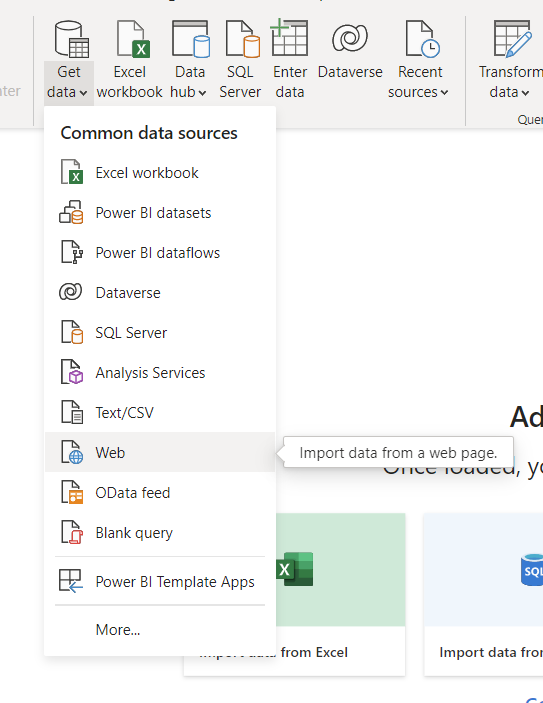
-
Click on advanced and replace {domain} with the website domain and {table_name} with the table you wish to add
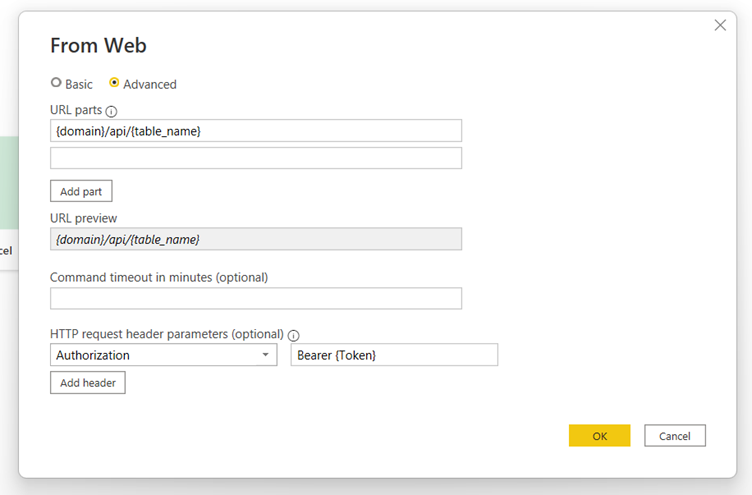
-
Next type
Authorizationinto the request header -
Finally type exactly
Bearer {token}and replace {token} with your provided token -
e.g.
Bearer 12345678 -
Upon clicking OK the api should grab and request the data
Basic information
- Access to the API is secured via an authentication key
- The API is currently rate limited to 1000 requests per minute
- To see all table urls click here
- Some tables are paginated due to the size of the data they contain (paginated access makes the api quicker and more responsive), see paginated access in the reference below
- If you would like the tables not be paginated please let us know so we can change this.
API Reference
Example - Domain may change on production release
https://api.probeoildatabasel.co.uk/api/{table_name}
Get all items
{domain}/api/{table_name}
| Parameter | Type | Description |
|---|---|---|
domain |
string |
Required. The api domain name |
table_name |
string |
Required. The table you want to access |
Get all items (pagniated)
{domain}/api/{table_name}?page={page_id}
| Parameter | Type | Description |
|---|---|---|
domain |
string |
Required. The api domain name |
table_name |
string |
Required. The table you want to access |
page_id |
string |
Required. The page id e.g. 1 |
Get item
{domain}/api/{table_name}/{id}
| Parameter | Type | Description |
|---|---|---|
domain |
string |
Required. The api domain name |
table_name |
string |
Required. The table you want to access |
id |
string |
Required. The primary ID for a row in the table |
Get paged items
Some tables are paged to reduce server load and increase the api response time, click the button below to copy the PowerBI script, it will handle all paged tables for you.
Remember to update the {domain},{table_name} and {token}variables in the first 2 lines though
let
    BaseUrl         = "{domain}/api/{table_name}",
    Token           = "{token}",
    EntitiesPerPage = 10000,

    GetJson = (Url) =>
        let Options = [Headers=[ #"Authorization" = "Bearer " & Token ]],
            RawData = Web.Contents(Url, Options),
            Json    = Json.Document(RawData)
        in  Json,

    GetEntityCount = () =>
        let Url   = BaseUrl,
            Json  = GetJson(Url),
            Count = Json[#"total"]
        in  Count,

    GetPage = (Index) =>
        let Skip  = "?page=" & Text.From(Index),
            Url   = BaseUrl & Skip,
            Json  = GetJson(Url),
            Value = Json[#"data"]
        in  Value,

    EntityCount = List.Max({ EntitiesPerPage, GetEntityCount() }),
    PageCount   = Number.RoundUp(EntityCount / EntitiesPerPage),
    PageIndices = { 1 .. PageCount },
    Pages       = List.Transform(PageIndices, each GetPage(_)),
    Entities    = List.Union(Pages),
    Table       = Table.FromList(Entities, Splitter.SplitByNothing(), null, null, ExtraValues.Error),
in
    Table
| Parameter | Type | Description |
|---|---|---|
domain |
string |
Required. The api domain name |
table_name |
string |
Required. The table you want to access |
token |
string |
Required. Your authorization token |
Tables
All accessible tables are displayed below with their matching urls
Parameters
| Parameter | Type | Description |
|---|---|---|
domain |
string |
Required. The api domain name |
?id |
string |
Optional. If provided will allow access to a single row |
Table list
| Table | Table url | Paginated? |
|---|---|---|
Address |
{domain}\api\addresses\{?id} |
No |
Enquiry |
{domain}\api\enquiries\{?id} |
No |
CUSTOMER |
{domain}\api\customers\{?id} |
No |
ENQ_LINE |
{domain}\api\enqline\{?id} |
Yes |
PRODUCT_CODE |
{domain}\api\productCodes\{?id} |
No |
TRAVEL |
{domain}\api\travels\{?id} |
No |
TRAVEL_ITEM |
{domain}\api\travelItems\{?id} |
Yes |
TRAVEL_ITEM_OP |
{domain}\api\travelItemOps\{?id} |
Yes |
PO |
{domain}\api\po\{?id} |
No |
ENQ_OP |
{domain}\api\enqOp\{?id} |
No |
PO_EL |
{domain}\api\poEl\{?id} |
No |
DN |
{domain}\api\dns\{?id} |
No |
DN_ITEM |
{domain}\api\dnItems\{?id} |
No |